
Starting June 15, 2026, you’ll find some important new features in your Host profile designed to make it easier to organize and manage visits, keep your records organized, and facilitate communication with WWOOFers.
Below, we’ll explain the new features and how to use them.
A new section for visits
Until now, conversations in your inbox were sorted by the date of the last message exchanged: this could make it difficult to quickly identify an upcoming visit, especially when the conversation had started many months earlier.
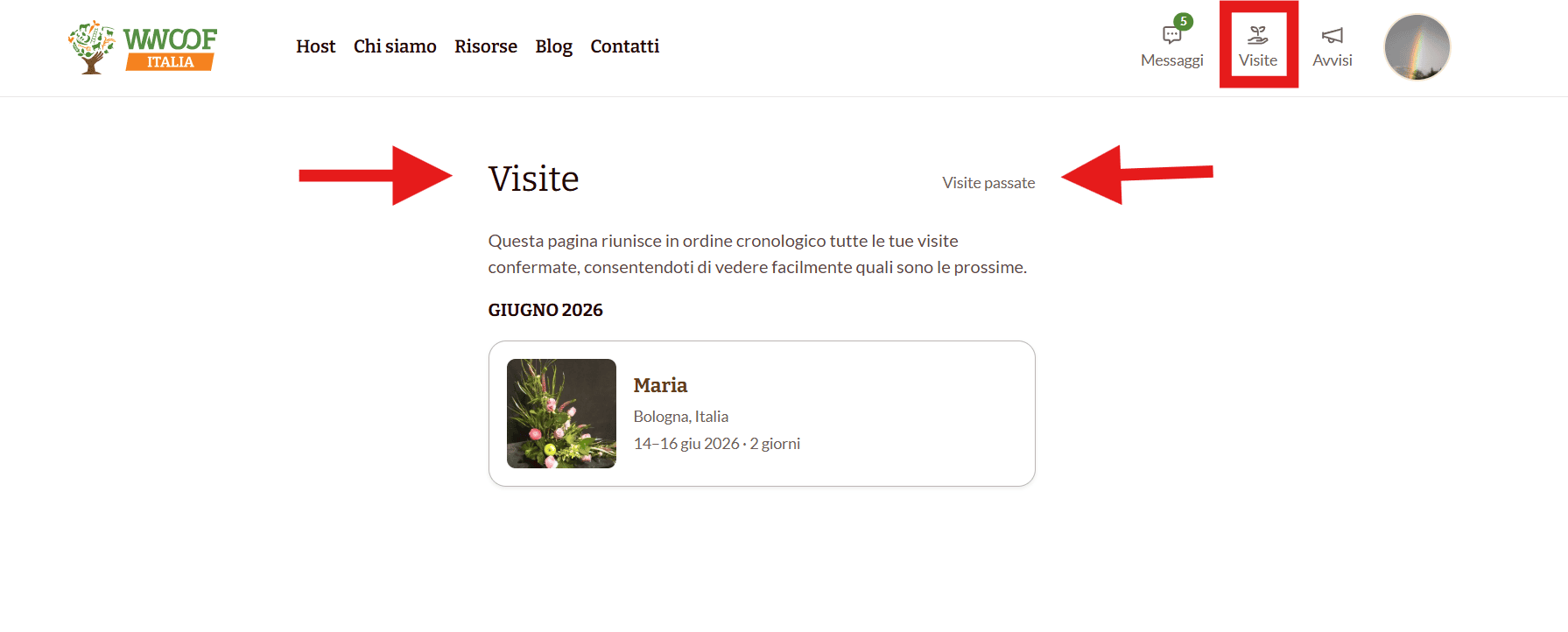
To address this issue, we’ve added a new section dedicated to visits on your profile, where all confirmed visits will be organized in chronological order .
To access it, simply go to your profile and click the “Visits” icon in the top right corner . This will open a page where you’ll find:
- upcoming visits, sorted by start date;
- the archive of past visits, which can be viewed at any time.
If you’re also a WWOOFer, on this page you’ll find both the visits you’ll receive as a host and the opportunities to go WWOOFing on other members’ farms. In that case, we recommend you also take a look atthe article dedicated to WWOOFers.

A separate page for each visit
From now on, every confirmed visit will have its own summary page that brings together all the most important information in one place.
Clicking on the visit you’d like to view will open the corresponding page, where you can:
- view the WWOOFer’s profile;
- send messages to the WWOOFer;
- use the WWOOFer’s phone number;
- read their profile, find out what languages they speak, and learn about their dietary needs;
- add the visit to your personal calendar (Google or other);
- change the visit dates or cancel the request;
- contact the WWOOF staff if needed
Just to clarify!
From now on, once a visit request is confirmed, the location of your farm will be visible to the WWOOFer. Make sure your address is written correctly.

Sharing phone numbers
When a WWOOFer confirms a visit, your phone number and the WWOOFer’s phone number will automatically be shared on the page for your visit.
This feature is currently set to “on” by default, but you can change it at any time by clicking the “settings” icon on your profile and unchecking the box next to “Share my phone number when a visit is confirmed.”

Here’s a tip!
To avoid any issues, please make sure the phone number in your profile is correct and includes the international dialing code, which you can select from the drop-down menu (for example, +39 for Italy).
For now, these updates are only available on the website, but we’ll let you know as soon as they’re available on the app too. In the meantime, we hope that organizing a WWOOFing experience will be even easier and more enjoyable for you from now on!








0 Comments